Make video ads with your own AI creator in one afternoon.
No camera, no actors, no agency. You build a consistent AI face and voice, write a demo script, generate the clips and cut a 9:16 ad that's ready to post.
Lesson 1 arrives by Oct 28, the rest by Nov 8. Full refund any time before Nov 8, and for 14 days after.
Median per video. Beginners start around $100. Plus shipping the product and waiting on their schedule.
The tools are free or already in a Google AI Pro plan. Jake's 8-second test clip used 20 Flow credits.
Once. Founding price for the first 100 members, until Nov 8.
Creator rates: Influee, UGC rates 2026.
The afternoon, shot by shot
Five lessons, in the order you'll actually make the ad.
Each lesson covers one tool, so when a tool changes, only that lesson gets re-recorded.
The creator
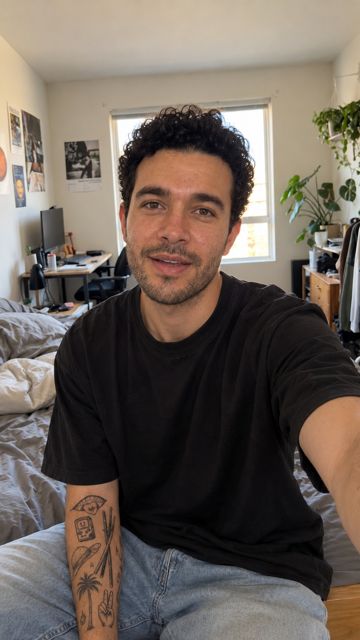
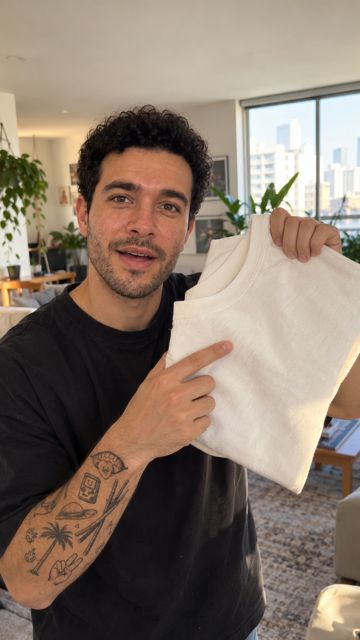
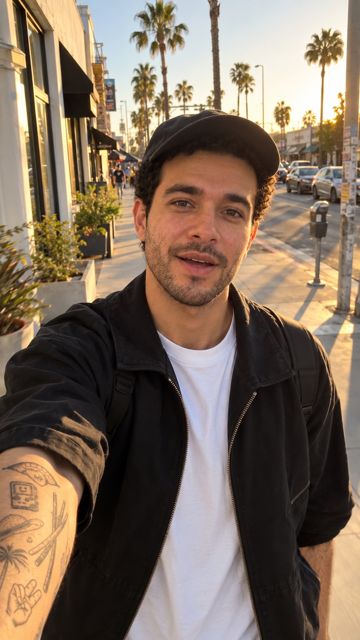
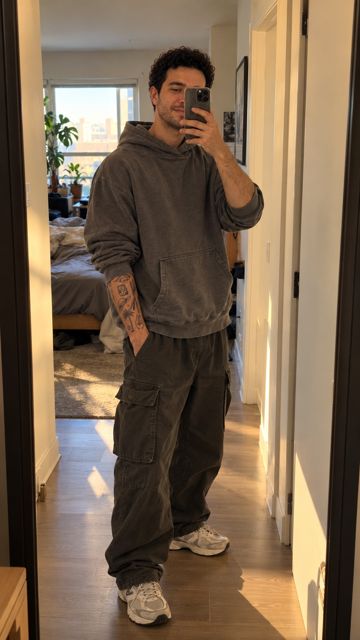
One reference face, then six scenes where it's clearly the same person: bedroom, mirror, street, desk, car, product close-up.
The voice
A fixed voice that sounds the same in every ad, built with a free open-source model on a free cloud GPU.
The script
A 15–20 second demo format: hook, what the product is, the demonstration, the call to action. Prompts included.
The clips
Image-to-video in Flow, which model to use for tests and which for the final take, what to do when the product comes out wrong, and how to practice for free.
The cut
Clips, voice and captions in a 9:16 timeline, plus the AI label every platform now expects.

Meet the demo creator
This is Jake. He doesn't exist.
- Age
- 27, on screen
- Style
- Streetwear, Los Angeles
- Built in
- One evening
- Camera
- None
Keeping a face the same across scenes is the hard part, and it's what Lesson 1 is about. You'll build your own creator, not borrow Jake.
Made with this method
One face, every scene.
Every image and clip below is AI-generated from a single reference photo. Same person, different places, no camera.

House rules
Ads that are honest about being AI.
These rules are in every lesson, because they keep your ads and your accounts out of trouble.
Demonstrate, don't testify
The creator shows the product and states its facts. No "I tried it" and no fake reviews. The FTC treats fake testimonials from AI people the same as from real ones.
Label it
Every ad carries the platform's AI-content label and "AI-generated" in the caption. Viewers know what they're watching.
Real product, real claims
Only claims the seller can back up. When the video model distorts a logo, you cut to real product footage instead.
Fit check
Who this is for
A good fit if you
- Run a small store and want product videos without hiring creators
- Freelance or work in marketing and want to offer AI video ads
- Want to post product content without showing your face
- Have never edited a video and want one clear, short path
Not a fit if you
- Want to pass an AI person off as a real customer
- Are looking for an income promise or a get-rich plan
- Need long-form films or cinematic work
- Don't want to use Google Flow for the video step
Founding members
Pay $19 now. Get the lessons by Nov 8.
This is a pre-sale. Founding members pay less and help decide what goes into the final cut. If it's not for you, you get your money back.
$19$27
Founding price ends Nov 8
- 5 video lessons, about 60 minutes in total
- Demo-ad script template and 10 core prompts
- Publishing checklist with AI labeling for Instagram and TikTok
- Practice free with Flow's daily credits; you only pay Google (AI Pro) when you're ready to produce
Optional at checkout: Prompt Pack with 25 prompts, $5.
$29$39
Course + Mega Prompt Pack
- Everything in Founding
- Mega Prompt Pack: 100 prompts for faces, 25 scenes, motion and 20 demo-ad scripts by niche
- Voice and style presets for a consistent creator
- Delivered with the lessons by Nov 8
Free guide
Not ready yet? Start with the face.
"5 prompts for a consistent AI creator face": the prompts behind Jake, sent to your inbox.
Questions
Before you buy
Do I need to show my face or my voice?
No. The creator's face, voice and clips are all generated. You only appear if you want to.
What tools do I need, and what do they cost?
The video and image steps use Google Flow and Nano Banana Pro, which come with a Google AI Pro plan. You can practice with Flow's free daily credits and only subscribe when you're ready to produce, then cancel any time. Lesson 4 shows how to stretch credits. Everything else is free: the voice model, the cloud GPU and CapCut. University students should check Google's official student offer first.
Will the ads look fake?
Some takes will, and the course shows you how to spot and drop them. The method keeps the same face across scenes, uses handheld phone-style framing and cuts to real product footage when the model gets a logo wrong. The ad is still labeled as AI either way.
I've never edited a video. Can I do this?
Yes. The editing lesson is a 10-minute walkthrough in CapCut's free version: drop in clips, add the voice, turn on auto-captions, export in 9:16.
Is this a "make money online" course?
No. It teaches you to make one kind of video ad quickly and cheaply. What you do with that skill (your own store, clients, content) is up to you, and we make no income promises.
Can I make ads for other people's products?
Yes, as long as you follow the house rules: demonstrate instead of testify, label the ad as AI, and only make claims the seller can back up.
When exactly do I get the lessons?
Lesson 1 arrives by email by October 28, 2026. Lessons 2 to 5 arrive by November 8, and each one is sent as soon as it's finished.
How do refunds work?
Reply to your receipt email or write to jakeaicreator@gmail.com. Full refund any time before November 8, and for 14 days after the lessons are delivered.